Wondering which parental monitoring app is right for your kids in Santa Clarita, AirDroid vs Bark? Discover the app that keeps SCV kids safe while respecting trust and privacy.
With its parks and trails, Santa Clarita is well known as a family-friendly community in the US. It was ranked third among California’s safest cities to raise children few years ago. However, like other places, children here are increasingly gaining access to smartphones and social media at younger ages. And consequently, parents are facing a new kind of challenge.
These worries include cyberbullying, inappropriate content, and, by extension, concerns about offline safety when the kids are out alone. SCV families have turned to parental monitoring apps to solve these problems. But the question is: Which parental app—AirDroid or Bark—fits SCV families best?
Part 1. Overview of AirDroid Parental Control vs Bark
AirDroid offers a wide range of features for real-time device monitoring to prevent external risks and self-harm. These features include (remote) screen monitoring, text or image detection, location tracking, and screen time management. Its new Focus Mode also encourages kids to practice balance and build lasting self-control.
While Bark focuses on avoiding online risks through its advanced AI, which scans texts on over 30 social media platforms for inappropriate language and concerning behaviour. It analyzes context and sentiment in content. It sends parents alerts when potential threats are detected, though it lacks advanced remote monitoring.
Part 2. Key Features Compared with Parenting Scenarios
To better understand how these apps cater to different parenting needs, let’s explore their key features through practical scenarios.
Offline Safety & Emergency Response
For a typical family outing in Santa Clarita, AirDroid has digital tools that ensure offline safety and peace of mind for all family members.
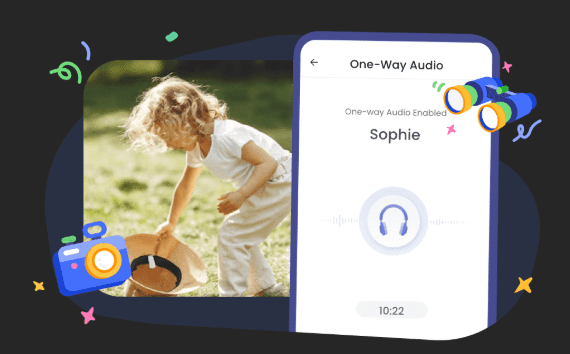
Imagine your family at Six Flags Magic Mountain or a mall, and the teen isn’t answering their phone. AirDroid allows you to remotely activate its camera to see their surroundings, or listen for ambient noise to quickly assess their situation and safety. It’s a great app for real-time situations.
Bark takes a different approach. It focuses on digital warnings because its strength is in its digital monitoring, not providing information about phone surroundings.
That means, as a Santa Clarita parent, it can alert you about a distressing conversation or update from texts, emails, or social media, but it won’t allow you to see or hear your kid’s immediate environment. You can’t remotely check your child’s safety at their friend’s place.
Online Content & Social Interaction Monitoring
AirDroid allows you to monitor your kids’ online activities. Social media apps are surely getting more popular among SCV teens. Through AirDroid, you can keep an eye on content on big platforms like Instagram, Snapchat, TikTok, SMS and more—where most of them are hanging out online. It will flag and give you a direct heads-up if there’s an issue.
You’ll also see what’s being received or who they are chatting from Notifications, giving you a clear window into their moves.
For special cases, you can even view your child live screen on his Android devices to get more insights about what is happening online.
Bark not only monitors activities on the popular platforms like AirDroid but also the lesser-known apps on the Internet. If you suspect your child might be going beyond the big platforms, exploring lesser-known apps and inappropriate communities online, Bark has the broader safety net. Its real strength is its vast network of more than 30 apps, including niche or emerging ones you might not even know exist.
Screen Use & Focus Mode
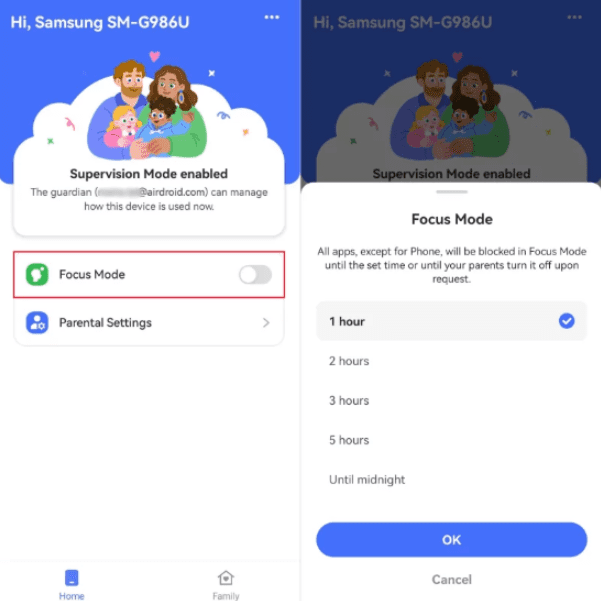
If you are interested in screen-time management, AirDroid’s new “Focus Mode” is it. This feature allows your child to express self-discipline without encroaching or nagging.
Imagine your kid needs to study for a test at Rio Norte Junior High. They can choose to turn on Focus Mode, which blocks distracting apps or games for a set time. This is not you forcing them to put their phone away. It’s a tool they can use to build healthy habits.
Bark’s approach to screen time is more about your control than your kid’s self-discipline. It allows you to set schedules to block apps or the entire Internet during designated times, like during school hours or at bedtime.
However, it doesn’t have a feature that lets the child actively choose to lock their own phone, missing an opportunity to help them learn to manage their own screen time and distractions independently.
Location & Travel Safety
AirDroid allows you to set up “geofences” around key spots in SCV, such as your kid’s school or a friend’s house. The app will alert you when your child arrives or departs from the spots. That way, you don’t have to keep checking your phone.
If you want to navigate to your child’s location, simply tap the navigation button in the app, and it will automatically open your installed map app with the location already entered.
If you need to investigate further, you can remotely activate their camera or microphone through the app. That’s a lifesaver, letting you see and hear their surroundings to confirm their safety.
Bark uses a check-in model, where your child can manually share their location with you. This works well for confirming their arrival or departure from a place.
However, it does not offer live surroundings in the case of an emergency. While it does allow you to see your child’s location and review their location history, it does not provide features to monitor their real-time environment or listen to their surroundings.
Part 3. Ease of Use for Busy Parents in Santa Clarita
If you are a busy parent in SCV, ease of use is everything. You’re likely juggling school drop-offs, sports practices at the Santa Clarita Sports Complex, and a demanding work schedule. The last thing you need is a complicated app.
AirDroid’s layout is easy to navigate, making it a good fit for parents who prefer a direct, command-and-control style of parenting technology. The dashboard is clean and straightforward. One tap gives access to the key features. However, as expected, it does require you to initially set up and customize which apps and content you want to monitor.
Bark’s management is different. You are required to do the initial setup to connect to all of your child’s social media accounts. But once it’s running, the Bark AI takes over. It automatically scans for risks across the linked platforms and only sends you an alert when it finds something truly concerning. So if you don’t have time to check the dashboard and prefer to entrust the app, this approach is good.
Part 4. Pricing & Value for Local Families
If you are like other Santa Clarita families, you probably are interested in social activities, such as sports, dance, and other extracurriculars. These all require a budget, just as much as digital safety.
AirDroid offers a free tier with basic features. However, its powerful remote tools require a subscription starting at $9.99/month, $19.99/quarter, or $59.99/year—under $5/month annually—for up to 10 devices, with a 3-day trial for all new users without any limitations. That’s a steal for SCV families juggling multiple kids’ phones.
Bark offers a plan covering all devices for a family, priced at $14/month or a discounted $99/year, plus a 7-day trial after adding the payment card.
Part 5. Which App Works Best for Different Santa Clarita Families?
In terms of functions, choosing the right app depends heavily on your parenting style and your child’s age.
AirDroid is a great choice for SCV families with younger teens or middle schoolers who are just getting their first phone. If you want to perform real-time environment checks, especially with your kid navigating new independence at different places, AirDroid is ideal.
Also, its Focus Mode aligns with families who want to actively teach self-discipline and manage screen time around homework and extracurricular schedules.
Bark is a great option if your kids are older and may venture beyond mainstream apps. Its strength lies in its AI-driven, wide-net approach to online monitoring.
Parents who are less concerned with real-time location and more concerned with detecting risks like online predators will prefer it. It’s also great for parents who prefer a hands-off, alert-based system that still provides a safety net.
Part 6. Local Parenting Resources & Next Steps
Irrespective of the app you finally choose, it’s important to acknowledge that technology is just one piece of the digital parenting puzzle. Here are a few other things you should add as a parent.
Engage School District Digital Safety Initiatives
You should participate in the initiatives provided by local school districts, such as the one William S. Hart Union High School District just held. These resources are designed to complement parental monitoring apps and offer a more holistic approach to digital well-being.
Join Local Parenting Groups
For a more personal connection, consider joining local parenting groups or organizations like the Child & Family Center or the SCV Holistic Moms Network. These groups provide support and a chance to learn from other Santa Clarita parents facing similar challenges.
Try Free Trials
Before committing to an app, you might want to try it out first. AirDroid offers a 3-day free trial for all new users, allowing you to test its remote features and see if it aligns with your family’s needs. Bark doesn’t offer a free trial without adding payment method, but its website provides resources to help you understand how its AI-powered monitoring works.
Final Remarks
You will have observed that choosing between the two, AirDroid vs Bark, is about finding the right balance that works perfectly for your family.
AirDroid is ideal for those who prefer direct control, real-time physical safety checks, and teaching self-discipline, while also being strong on major social media apps. Bark, on the other hand, is great for families with older, more independent teens, prioritizing privacy-respecting, AI-driven alerts across their entire digital world. Both apps are excellent investments in your child’s safety.
However, pick what fits your budget and needs to keep your kids safe, online and off, in this vibrant valley.