Learn how to Remove People from Photos for Free and use the Free Image Background Remover with EzRemove. Achieve professional results in seconds using AI-powered tools—no Photoshop required!
Introduction: Effortless Photo Editing with EzRemove
Have you ever taken a great photo, only to find that someone is in the background when they shouldn’t be? Whether it’s an unwanted guest, a photobomber, or a person in the background that you want to remove, EzRemove offers an easy, free solution. Additionally, if you need to remove backgrounds from your images, EzRemove has you covered there too with its Free Image Background Remover.
Both tools are fast, free, and powered by AI, providing you with seamless results without the need for complicated editing software like Photoshop. Let’s take a deeper look at how you can use these tools to clean up your photos and make them look flawless.
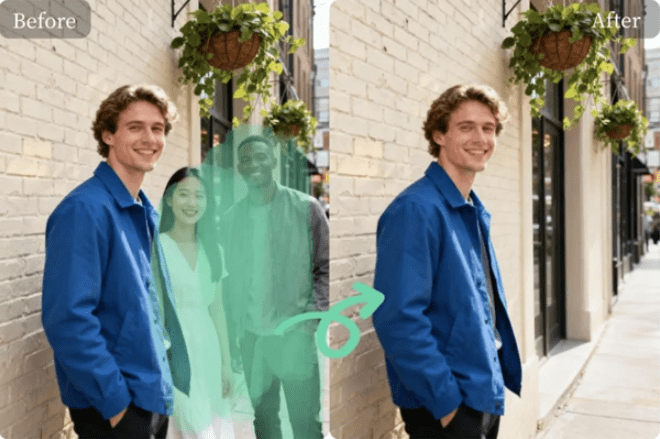
How to Use EzRemove’s Photo Editing Tools
1. Remove People from Photos for Free
Sometimes, you may want to remove a person from a photo for various reasons. Whether it’s a photobomber ruining a shot or a family member you’d like to exclude from the frame, EzRemove makes it easy to Remove People from Photos for Free.
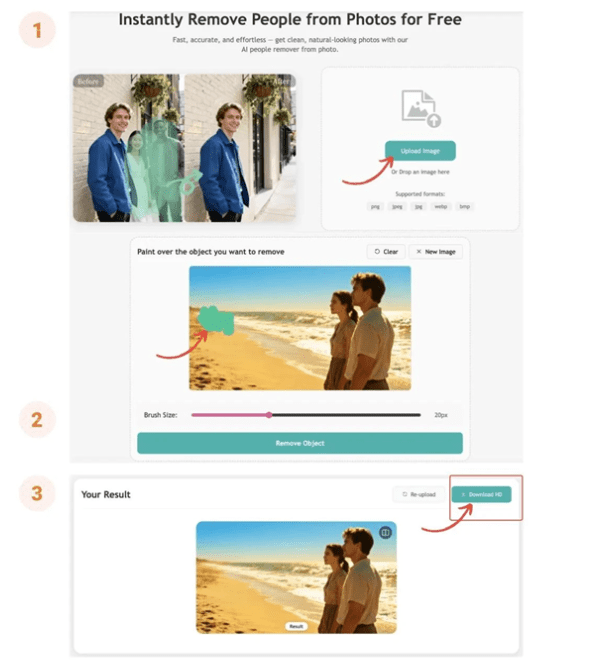
Steps to Remove People from Photos for Free:
- Upload Your Image
Visit Remove People from Photos for Free and upload your photo. It supports JPG, PNG, and WEBP image formats.
- Select the Person to Remove
Use the brush tool to highlight the person or people you want to remove from the image. Be precise in selecting the area around the person for the best result.
- Click “Remove”
Once you’ve selected the area, click “Remove”. The AI will automatically remove the person and fill in the background seamlessly, making it look natural.
- Download the Edited Image
After the person is removed, you can preview the image and download it in HD quality, ready for use in your project or on social media.
Key Benefits:
- Seamless Results: The AI automatically blends the background, so there’s no trace of the person.
- Quick & Free: This tool is completely free, and it’s fast—perfect for editing on the go.
- User-Friendly: No need for advanced skills; just upload, highlight, and remove!
2. Free Image Background Remover
If you need to remove backgrounds from your photos—whether it’s to isolate a product, create social media graphics, or make a clean, professional portrait—EzRemove’s Free Image Background Remover is your solution.
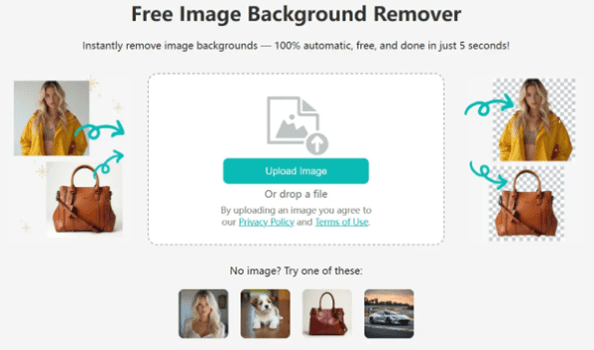
Steps to Use the Free Image Background Remover:
- Upload Your Image
Visit Free Image Background Remover and upload your image. Supported formats include JPG, PNG, and WEBP.
- Let the AI Work
Once uploaded, EzRemove’s AI will automatically detect the background and remove it, leaving you with a transparent PNG or a clean image with a new background.
- Download the Cleaned Image
After the background is removed, preview your image and download it. You can choose to download it as a transparent PNG or as a standard image in your desired format.
Key Benefits:
- Automatic Background Removal: The AI works in seconds to remove the background, giving you professional-quality results.
- Completely Free: There’s no cost involved for removing backgrounds or making any other edits.
- High-Quality Results: Perfect for creating professional-looking product photos, portraits, or social media images.
Why Choose EzRemove for Your Photo Editing Needs?
1. AI-Powered Precision
Both the People Remover and the Image Background Remover rely on AI technology to ensure high accuracy and precision. Whether it’s removing people or backgrounds, EzRemove’s AI ensures natural and seamless results every time.
2. Free and Easy to Use
There are no hidden charges or subscriptions with EzRemove. You can use the tools as much as you like without worrying about fees. The interface is simple and user-friendly—just upload your image, let the AI work, and download your edited photo.
3. Fast and Efficient
Both tools are designed for speed. Whether you’re removing a person from a photo or eliminating an unwanted background, EzRemove gets the job done in seconds, saving you time on tedious edits.
4. Accessible Anywhere
Since EzRemove is entirely web-based, you can access it from any device with an internet connection—whether it’s your desktop, laptop, tablet, or smartphone. Edit your photos from anywhere, at any time.
Real-World Use Cases for EzRemove
1. eCommerce Product Photography
For online stores, professional product photos are a must. EzRemove allows you to quickly remove backgrounds from product images or remove unwanted people from stock photos, ensuring a clean and polished look for your listings.
2. Social Media Content Creation
If you’re a social media influencer, blogger, or content creator, EzRemove helps you create eye-catching visuals. Remove people or distracting backgrounds from your images, making them perfect for Instagram, Facebook, and other platforms.
3. Photography and Design
Photographers and designers can benefit from EzRemove by quickly editing photos—whether it’s for portrait retouching, background removal, or removing people from photos in order to highlight specific subjects.
FAQs: Photo Editing Help
Q1: Is EzRemove really free?
A1: Yes! Both the People Remover and the Image Background Remover are completely free to use, with no hidden charges or subscriptions.
Q2: Can I use EzRemove on my phone?
A2: Absolutely! EzRemove works perfectly on mobile devices, allowing you to edit photos on the go.
Q3: What formats does EzRemove support?
A3: EzRemove supports JPG, PNG, and WEBP formats for image uploads.
Conclusion: Fast, Free, and Powerful Photo Editing with EzRemove
Whether you need to Remove People from Photos for Free or use the Free Image Background Remover, EzRemove offers fast, free, and easy-to-use tools to enhance your photos. Powered by AI, these tools ensure seamless results, helping you edit your images like a pro without the need for complex software.
Try EzRemove today and experience how easy photo editing can be!