Walk through any Concerts in the Park evening or a Christmas in July gathering, and you’ll spot them right away: parents with phones raised, students filming quick skits, and small business owners capturing their booth for a social post. Santa Clarita has always loved a good story, and more of us are telling those stories with video now. The tools finally caught up to the ambition, too. A free browser-based option like the Clideo video editor lets anyone trim, caption, resize, and clean up a clip without buying expensive software or sitting through a tutorial marathon. For those looking to learn more about simple video editing tools, click here to explore an easy way to edit and prepare clips for sharing. That shift matters for a valley where local news, school events, and neighborhood happenings all deserve to be seen. In the next few minutes, you’ll learn why video has taken over local storytelling, who’s actually behind the camera, and a simple routine you can copy to cover your own corner of SCV.

Why Video Took Over Local Storytelling
People used to write a paragraph about the softball championship. Now they post a 30-second highlight. The reason is simple: a short clip carries the sound of the crowd, the look on a coach’s face, and the exact second the ball clears the fence. Text can describe that. The video lets you feel it.
Local video also travels fast. A resident films a power outage update in Stevenson Ranch, and neighbors share it within minutes. That speed keeps the whole community in the loop, especially during summer heat warnings or road closures when timing really counts. A written notice might reach a few dozen people. A clear 20-second clip can reach thousands before dinner.
There’s a trust factor at play, too. When you see the actual scene, you rely less on secondhand accounts. A short recording of a city council meeting or a school board retreat gives residents the raw moment instead of a summary. That kind of transparency builds confidence in the story being told.
And it’s not just breaking news. Think about the smaller stuff that makes SCV feel like home:
- A high school band rehearsing before the fall season
- A church backpack giveaway that fills up a parking lot
- A West Ranch grad coming home after a big win
- A new community group meeting for the very first time
- A local bakery pulling fresh trays out of the oven at sunrise
Each of these lives better as a clip than a caption. The quick recap: video wins locally because it’s fast, honest, and easy to share.
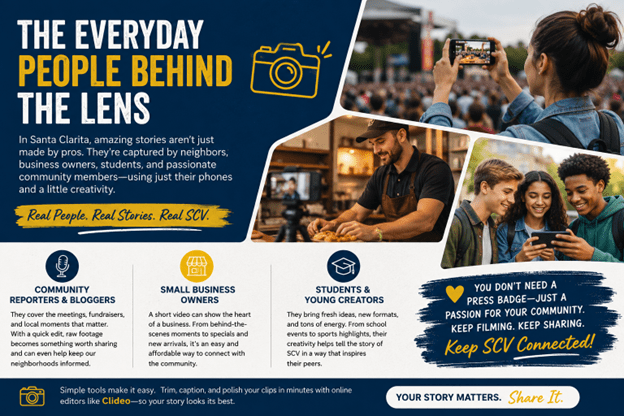
The Everyday People Behind the Lens
You don’t need a press badge to document your part of the valley. Some of the best local content comes from folks who never planned to become creators. They just cared about a moment and wanted others to see it.
Community Reporters and Bloggers
Plenty of residents run neighborhood pages or hyperlocal blogs. They cover the meetings, the fundraisers, and the stories bigger outlets sometimes miss. A quick edit turns raw phone footage into something people actually want to watch and pass along. One neighbor filming a road repair update can save a whole street from confusion.
These creators often work alone, with no crew and no budget. That’s exactly why simple editing tools help so much. Trimming out the shaky first five seconds and adding a title card can make an amateur clip look intentional. The story stays local, but the presentation gets sharper.
Small Business Owners
A bakery in Newhall, a barber in Canyon Country, a fitness studio in Valencia. Video shows the feel of a place in a way photos can’t. Owners film a behind-the-counter moment, add their hours and address as on-screen text, and post it before the morning rush. It costs nothing but a few minutes and a phone.
Short clips also double as low-cost advertising. A 15-second look at a new menu item or a weekend sale can pull in foot traffic without a single dollar spent on ads. For a small shop watching every expense, that’s a real edge over pricier promotion.
Students and Young Creators
Teens in the Hart district and beyond grew up filming everything. Give them a school event, a class project, or a sports moment, and they’ll turn it into content that racks up views. The trick is helping them edit cleanly so the message actually lands instead of getting lost in a jumble of clips.
Young creators also experiment with formats older folks might skip: split screens, quick captions, trending audio. When they aim that skill at community events, the results can surprise you. A student’s recap of a homecoming game often reaches more classmates than any official announcement.
What to Look for in an Online Video Tool
Not every editing app fits a casual creator. If you’re filming community moments and want to share them the same day, a handful of features make life much easier. You want speed and simplicity, not a steep learning curve.
Here’s what actually helps when you’re working fast:
- Runs in your browser so you don’t clog your laptop with heavy programs
- Simple trimming and cutting to grab the best 20 seconds out of a five-minute recording
- Subtitles and captions because most people watch with the sound off
- Resizing so the same clip fits a vertical story and a wider feed post
- Merging to stitch several short takes into one smooth story
- Audio control to mute background noise or drop in a little music
- Compression so large files upload quickly, even on a slow connection
Tools like Clideo bundle these into one place, which saves you from juggling three different apps. You can cut a clip, add captions, resize it, and export, all without installing anything. For someone covering a Saturday event who wants it posted by Sunday morning, that matters.
The goal isn’t a Hollywood production. It’s a clear, watchable clip that respects your viewer’s time. Pick the tool that gets you there with the least friction.
A Simple Workflow for Covering a Local Event
Say you’re headed to a Saturday event at Central Park. Here’s a routine that keeps things painless from start to post.
Step 1: Film in Short Takes
Shoot 10 to 20 seconds at a time instead of one long recording. Short clips are far easier to sort and edit later. They also give you natural break points, so you’re not scrubbing through minutes of footage to find one good moment.
Step 2: Pick Your Best Moments
Back home, choose three or four clips that tell the story. Look for the parts with real emotion or action: the applause, the winning play, the ribbon cutting. Leave the rest on the cutting room floor.
Step 3: Trim and Stitch
Cut the dead air at the start and end of each clip, then merge the good parts into one flow. Keep the pacing tight. A viewer will stay for a punchy 45 seconds but bail on a rambling two minutes.
Step 4: Add Captions
Type out what’s happening, or let an auto-caption feature handle the first draft and fix any errors. Captions help the roughly 80% of people who watch social video with the sound muted. They also make your clip friendlier for viewers who are deaf or hard of hearing.
Step 5: Resize and Post
Format it for wherever your audience hangs out, then share it while the event is still fresh. A vertical crop suits stories and reels, while a square or wider frame fits standard feeds. Post it that same day, and the local buzz works in your favor.
The whole thing can take 15 minutes once you get the hang of it. No studio, no crew, just you and your phone.
Common Mistakes to Avoid
A few habits trip up new creators. Dodge these, and your clips will look sharper right away.
- Filming is too long. Nobody watches a five-minute raw recording. Trim hard.
- Skipping captions. Silent autoplay means your message vanishes without text.
- Shaky footage. Brace your elbows or lean on a rail for steadier shots.
- Ignoring sound. Wind and crowd noise can drown out the moment. Add music or record a quick voiceover if needed.
Fixing even one of these lifts the quality of everything you post.
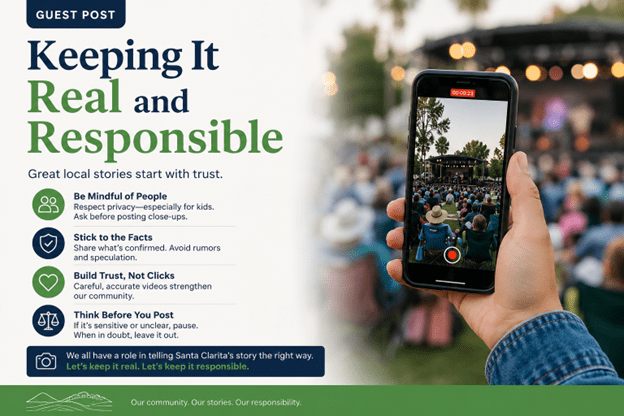
Keeping It Real and Responsible
A quick word on doing this well. When you film in public spaces around SCV, be mindful of the people in your frame, especially kids. Ask before posting close-ups of someone else’s family. If you’re covering something sensitive like an accident or a crime scene, stick to what officials have confirmed and skip the rumors.
Good local video builds trust. Careless video chips away at it. The people watching are your neighbors, and that connection is worth protecting. Accuracy and respect should ride along with every clip you share.
The Valley’s Story Is Yours to Tell
Santa Clarita never runs out of moments worth capturing. There’s a game, a concert, a grand opening, or a good deed happening somewhere every weekend. The barrier to sharing those moments keeps dropping, and that’s a win for everyone who cares about this community.
So grab your phone at the next event. Film the thing that makes you smile or the update your neighbors need to see. A little editing turns that raw clip into something people will actually stop and watch. Start small: shoot one clip this weekend, trim it, caption it, and post it. The valley has stories on every corner, and now the tools to tell them fit right in your pocket.