By Rishi
A workflow-first guide to choosing an AI product demo video maker for B2B and SaaS work.
TL;DR
The best AI product demo video maker for a mixed-input B2B workflow in 2026 is ngram, followed by Trupeer, Guidde, Loom, VEED, Synthesia, HeyGen, Canva, InVideo, and Descript.
- ngram covers all four audited starting-input categories.
- Trupeer and Guidde fit capture-led video plus written guidance.
- Loom and Descript suit fast narrated screen demos.
- Synthesia and HeyGen suit presenter-led localization.
- Canva, VEED, and InVideo fit designed or generated campaign scenes.
Choose the right AI product demo video maker for the job
Feature lists are a poor starting point for choosing an AI product demo video maker. A sales rep recording a two-minute answer, a product marketer building a launch asset, and a customer-education team maintaining 40 tutorials have different source material, review needs, and production bottlenecks.
The useful question is what the viewer must believe after watching. If the buyer needs proof that a workflow works, the real interface should carry the story. If the buyer first needs context, a script-led or presenter-led format can establish the problem before the interface appears. The ten tools below cover both ends of that range, along with the ground between them.
A demo is also an operational asset. The video file is only one part. Someone has to approve the script, preserve the source material, update changed screens, replace old embeds, and answer for every product claim.
The selection process should account for that full life cycle. A fast first render has limited value if the team cannot find and revise the source six weeks later.
Why product demos now carry more of the B2B story
Product demos used to sit near the end of a sales process. Buyers now encounter them in search, social posts, landing pages, sales follow-ups, onboarding sequences, and help centers. A demo may be the first time a prospect sees a product and the fifth time an existing customer checks how a changed feature works.
That wider role changes what “product demo” means. An awareness video may spend most of its runtime on the buyer’s problem and show only one decisive product moment. An evaluation walkthrough should expose more of the interface, including the inputs and output that support the claim.
A support clip can skip the category story and begin directly at the task. Treating all three as the same format usually produces a long video that serves none of them well.
Content Marketing Institute’s 2025 B2B research, based on 980 respondents, found that 76% had used video in the previous 12 months. Video trailed only short articles and posts among the six formats shown below. The same study found that 58% rated video the most effective content type measured, while 61% expected their organization to increase video investment.
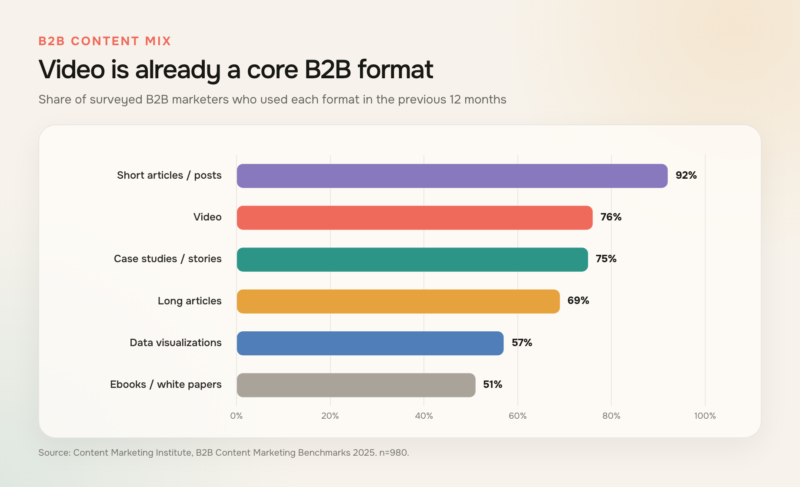
Video was used by 76% of surveyed B2B marketers, behind only short articles and posts among these six formats. Source: Content Marketing Institute, 2025 B2B research, n=980.
| B2B content format | Respondents who used it |
| Short articles or posts | 92% |
| Video | 76% |
| Case studies or customer stories | 75% |
| Long articles | 69% |
| Data visualizations | 57% |
| Ebooks or white papers | 51% |
Video itself is not one job. Wyzowl’s 2026 survey of 266 respondents found that 39% created product demos, alongside sales, customer-service, and onboarding videos. That spread matters because a single source package may need to produce a polished overview, a short sales answer, and a step-by-step tutorial.
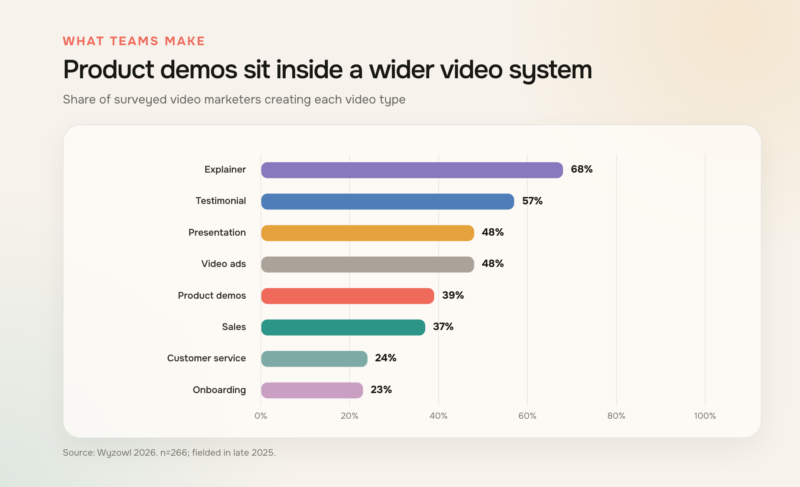
Product demos were created by 39% of respondents, placing them alongside sales, service, and onboarding video workflows. Source: Wyzowl, Video Marketing Statistics 2026, n=266.
| Business-video use case | Respondents creating it |
| Explainer videos | 68% |
| Testimonial videos | 57% |
| Presentation videos | 48% |
| Video ads | 48% |
| Product demos | 39% |
| Sales videos | 37% |
| Customer-service videos | 24% |
| Onboarding videos | 23% |
The case for care is stronger than the case for volume. In Wyzowl’s survey, 93% of video marketers reported better product or service understanding, while 89% of consumers said video quality affected trust in a brand. Those are reported perceptions and outcomes, not proof that video caused a lift. They still underline the cost of publishing a demo with tiny text, stale screens, or a claim the product cannot support.
For software companies, accuracy is part of production quality. A cursor should land on the control the narration names. A result should stay on screen long enough to read.
Captions should preserve product terminology, and a crop made for vertical video should not remove the field that proves the workflow. AI can accelerate individual edits, but these small decisions determine whether the demonstration remains credible.
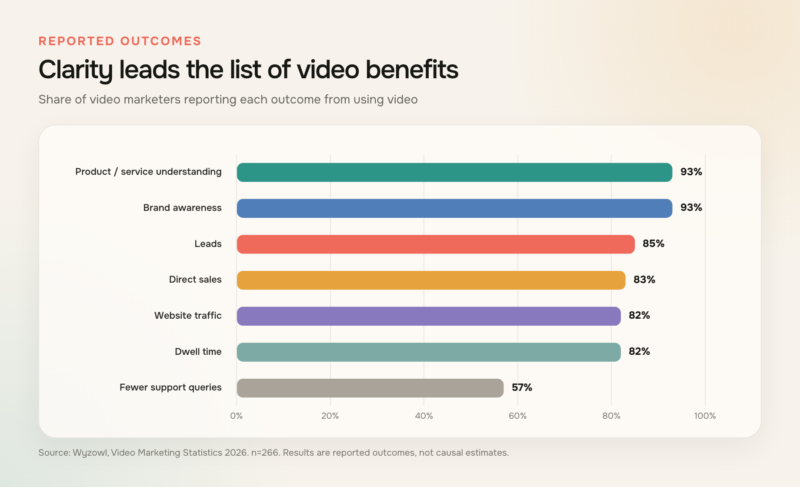
Video marketers most often reported stronger understanding and awareness; 57% also reported fewer support queries. Source: Wyzowl, Video Marketing Statistics 2026, n=266. Results are reported outcomes, not causal estimates.
| Reported video outcome | Respondents reporting it |
| Increased product or service understanding | 93% |
| Increased brand awareness | 93% |
| Generated leads | 85% |
| Increased direct sales | 83% |
| Increased website traffic | 82% |
| Increased dwell time | 82% |
| Reduced support queries | 57% |
How these AI product demo video makers were selected
This ranking compares the current workflows documented by each company as of August 17, 2026. It is not presented as a hands-on speed test. A capability counts only when a current official product page or help page describes it. The ranking also preserves a fixed editorial shortlist, so the useful task is to explain the fit and tradeoffs honestly.
Six criteria shaped the review:
- Buyer evidence. Can the workflow show the actual product, frame a narrative, add a presenter, or combine those forms?
- Starting inputs. Can the team begin with a brief, script, URL, file, uploaded media, or screen capture?
- Editing ownership. Can the person responsible make routine changes through text, a timeline, templates, or captured steps?
- Updateability. Can a small product change be corrected without rebuilding every scene?
- Output control. Are captions, voice, brand settings, localization, aspect ratios, and sharing options documented?
- Review discipline. Can the team keep product accuracy, permissions, accessibility, and brand approval in the workflow?
The criteria are deliberately ordered. Buyer evidence comes before the input method, and the input method comes before editing convenience. A team that needs to prove a live software action should not begin with a generated presenter simply because localization is easy. A team explaining an unfamiliar category should not force every idea into a raw screen recording just because capture is quick.
Ownership matters too. Product marketing may approve the narrative, a product manager may validate the interface, legal may review claims and usage rights, and customer education may inherit the asset after launch. A workable tool does not need to satisfy every stakeholder directly, but it should leave behind source material and a review path that those stakeholders can understand.
Security belongs in the brief before anyone records a screen. Use a controlled workspace with representative data, remove customer identifiers and private browser elements, and check what the selected plan does with uploads, generated media, collaborators, and retention. Procurement teams should verify those controls directly because a public feature page cannot answer every company’s policy question. The same rule applies to consent for a real presenter’s face or voice and to rights for stock, music, and uploaded campaign assets.
Content Marketing Institute’s 2026 research adds a useful warning about AI expectations. Among B2B marketers using AI for content, productivity and workflow improvements were reported much more often than content-performance gains. An AI tool can remove production friction, but the product story, evidence, and distribution plan still decide whether the video does useful work.
An AI video editor can speed assembly and revision. Procurement should still begin with the evidence, review path, and maintenance burden.
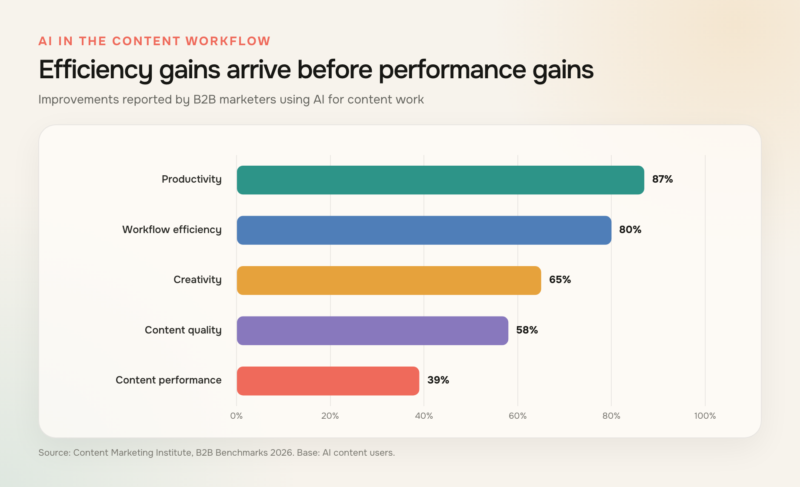
Productivity and workflow gains were reported more often than content-performance gains among B2B marketers using AI for content. Source: Content Marketing Institute, 2026 B2B research.
| Reported improvement among AI content users | Respondents reporting it |
| Productivity | 87% |
| Workflow efficiency | 80% |
| Creativity | 65% |
| Content quality | 58% |
| Content performance | 39% |
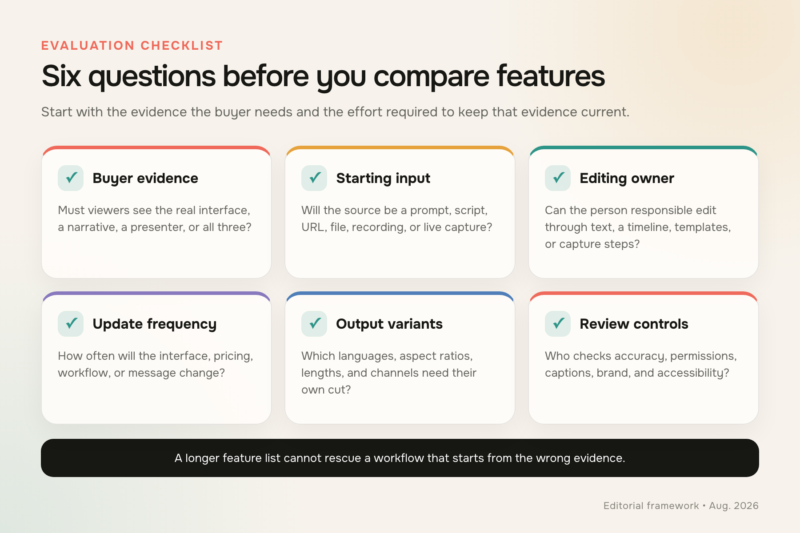
Start with the buyer evidence and maintenance burden, then compare production features.
What the official documentation shows
The mini-benchmark below records four kinds of starting material: a brief, script, or prompt; a screen capture or recording; an uploaded file, image, or other media; and a URL or product link. Each mark came from the official pages listed in the research ledger for this article.
This is a documentation-coverage audit, not a quality score. “Not found” does not mean a tool lacks a capability, and a count of four does not mean every input has the same depth or plan availability. The chart is useful because it exposes an early workflow question that broad “AI video” labels often hide.
Each category answers a different production need. Briefs, scripts, and prompts are useful when the narrative is still being shaped, whether the team writes directly or begins with an AI script generator.
Screen capture records product behavior. Files and media bring in decks, screenshots, brand assets, and existing footage. URLs or product links can provide source context without requiring the editor to transfer every detail manually.
The count also shows why two tools with the same total can still fit different teams. A recorder and a prompt-led generator may each document two input categories, yet one begins from product behavior and the other from a marketing idea. The yes-or-not-found matrix beneath the chart is therefore more informative than the total alone. Teams should use it to choose which official workflow to investigate, then confirm plan limits, import formats, collaboration controls, and export requirements during procurement.
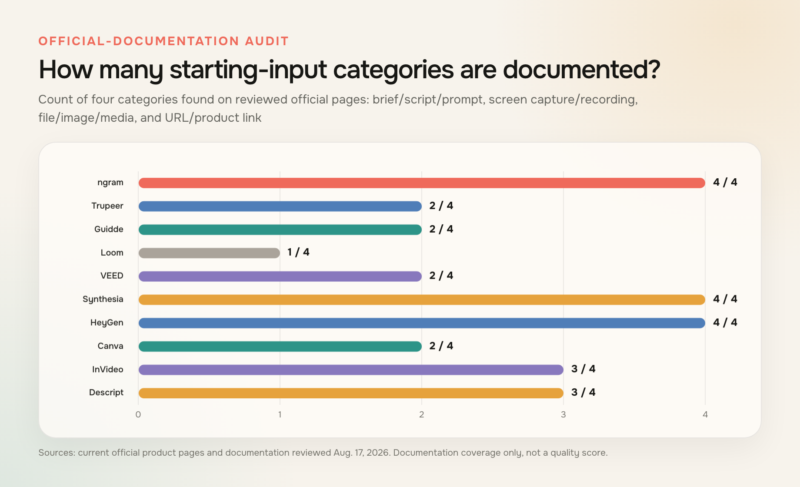
Count of four starting-input categories explicitly documented on reviewed official pages. This is a documentation audit, not a quality score. Sources: official product pages and documentation reviewed August 17, 2026.
| Tool | Brief, script, or prompt | Screen capture or recording | File, image, or media | URL or product link | Total documented categories |
| ngram | Yes | Yes | Yes | Yes | 4 |
| Trupeer | Not found | Yes | Yes | Not found | 2 |
| Guidde | Not found | Yes | Yes | Not found | 2 |
| Loom | Not found | Yes | Not found | Not found | 1 |
| VEED | Yes | Not found | Yes | Not found | 2 |
| Synthesia | Yes | Yes | Yes | Yes | 4 |
| HeyGen | Yes | Yes | Yes | Yes | 4 |
| Canva | Not found | Yes | Yes | Not found | 2 |
| InVideo | Yes | Not found | Yes | Yes | 3 |
| Descript | Yes | Yes | Yes | Not found | 3 |
The 10 best AI product demo video makers
The order below starts with the broadest fit for the brief, then moves through capture-led, presenter-led, design-led, and transcript-led options. “Best for” describes the workflow each product’s current documentation supports most clearly. It is not a promise that the same tool wins for every team, budget, or procurement environment.
1. ngram: Best for turning mixed product inputs into a polished demo
Best fit: B2B and SaaS teams that need to combine product evidence, narrative, and campaign formats in one production workflow.
ngram’s product demo video maker ranks first here because its current product state covers the widest practical starting set in the fixed shortlist. A team can begin with a prompt, PDF or Markdown document, URL, screenshot, screen recording, raw video, or deck. That flexibility matters when the source of truth is split between a product brief, a new interface, and existing sales material.
ngram (founded by Anish Muppalaneni and Devadutta Ghat in 2022) is a business video creation platform for teams across marketing, sales, HR, learning, customer success, operations, and internal communications. Product demos are one application; the same system can create sales enablement, customer onboarding, support, and employee training videos. The workflow extends beyond assembling inputs. ngram supports script and storyboard planning, captions, AI voiceover, product callouts, smart zooms, and screen-recording polish. Editors can work through chat, script, and timeline surfaces, which gives a product marketer a quick route for broad changes and a more precise surface for timing. Brand kits and 16:9, 9:16, and 1:1 exports support the common handoff from a core demo to web, social, and sales cuts.
When comparing an AI storyboard generator, check whether planning stays connected to recordings, narration, edits, and output versions. That link keeps the approved story and interface proof from drifting apart.
That breadth is most useful when a demo needs both explanation and proof. A marketer might open with the buyer problem, move into a real product recording, add a short voice-led explanation, and then create vertical and square variants from the same project. The result still requires human review. Product claims, interface details, captions, pacing, permissions, and brand use should be checked before any version is published.
A practical source package could include the approved brief, a clean product recording, screenshots of states that are hard to reproduce, a deck with positioning, and the final script. Keeping those ingredients together makes later changes more surgical. If one button moves, the team can replace the affected proof scene while preserving the approved setup, narration, and channel plan.
Before choosing it: Define the dominant source before production. If every asset is a rapid one-take screen message, a lighter recorder may be faster. If the brief mixes documents, URLs, footage, designed scenes, and several output formats, ngram’s broader workflow becomes more relevant. Also confirm which team owns final product accuracy after a feature or interface changes.
2. Trupeer: Best for video and documentation from one capture
Best fit: Customer education and operations teams that want a recorded workflow to become both a video and a written guide.
Trupeer’s official workflow begins with a browser capture or an existing recording. The product then turns that source into a polished walkthrough and step-by-step documentation, with AI-assisted script editing, voiceover, translation, and export. That paired output is useful when the same procedure must work for viewers who prefer video and readers who need searchable instructions.
The capture-first approach also gives teams a clear source of truth: the real sequence performed in the product. It fits repeatable enablement work such as feature walkthroughs, internal procedures, onboarding steps, and help-center updates. The written companion can reduce the temptation to maintain a separate document from scratch.
For a library project, that paired format can also make gaps easier to spot. If a written step needs a warning or prerequisite, the video script should address the same condition. The team can review one procedure for completeness before distributing it in two formats.
Before choosing it: Map the update process before building a large library. Ask how a changed menu, label, or workflow affects the video, written steps, translations, and every published destination. For a launch asset that needs many designed scenes outside the interface, compare the recording-led workflow with a multi-input editor.
3. Guidde: Best for repeatable visual how-to guides
Best fit: Support, onboarding, and enablement teams producing task-based guidance from real product actions.
Guidde documents capture across browser, desktop, and mobile workflows. After capture, teams can add AI voiceover, captions, and visual highlights, then publish the result as video and written guidance. Its current site also describes localization into more than 50 languages, which can be valuable for a distributed customer base.
The format is naturally suited to a narrow promise: show one task, remove irrelevant pauses, highlight the important control, and give the viewer a next step. That makes Guidde a sensible candidate for searchable support clips and feature education, especially when the value of the asset depends on the accuracy of the recorded sequence.
This narrowness can be an advantage. A customer who needs to change a permission setting does not need the platform origin story first. A focused guide can name the prerequisite, show the action, confirm the result, and end before attention drifts.
Before choosing it: Decide whether the deliverable is primarily a how-to guide or a campaign story. A capture-led guide can explain a procedure clearly, but a launch video may need a stronger setup, additional visual assets, and more deliberate scene pacing. Check the complete review and replacement workflow for localized versions before scaling the library.
4. Loom: Best for fast, conversational sales demos
Best fit: Founders, account executives, and customer-success teams sending quick screen-and-camera explanations.
Loom’s desktop recorder captures the screen, camera, and microphone, then provides trimming and editing around the recording. Its official product information also describes AI-generated titles, chapters, summaries, and calls to action, along with link sharing, comments, and engagement information. The workflow keeps the distance between “I should show this” and a shareable link short.
That low-friction pattern works for a prospect-specific answer, a handoff between colleagues, or a short explanation attached to a support conversation. The presenter’s voice and cursor can supply context without the production overhead of a scripted campaign video. It also makes iteration easy when the goal is a fresh answer rather than a permanent asset.
A sales enablement video built this way can answer one objection or show one account-relevant path without asking the viewer to search a general overview. The recording should still use a controlled demo environment and an intentional next step.
Personal context is the main strength of this format. A seller can refer to the prospect’s question, skip features that are not relevant, and spend time on the workflow under discussion. That can be more useful than forwarding the same polished overview to every account.
Before choosing it: Separate disposable communication from durable product marketing. A one-take recording can feel credible and personal, but a homepage demo or paid campaign may require tighter scripting, branded scene design, reusable source files, and planned aspect ratios. Establish a retention and replacement policy if recordings contain customer data or quickly changing interfaces.
5. VEED: Best for browser-based marketing edits
Best fit: Marketing teams that want generated scenes and conventional video editing in a browser.
VEED’s AI video maker documents prompt, script, and image inputs. It can generate or assemble a script, visuals, voice, avatar, and subtitles, after which the project moves into the browser editor for refinement. Resizing support makes it practical to adapt a core idea for multiple channels.
This workflow fits a product marketer who has a clear campaign message and a folder of screenshots, clips, and brand assets but does not want to move into a traditional desktop editor. Generated material can fill narrative gaps around real product footage, while the editing surface keeps captions, cuts, music, and layout in one place.
A script-led AI video workflow should leave its first pass open to conventional editing. The team can then replace generic scenes with accurate product footage wherever a claim needs proof.
The browser editor also suits review rounds that mix copy and visual feedback. One stakeholder can tighten the promise, another can replace a screen capture, and an editor can check pace and captions. The team should still establish which version is the approved master before producing channel variants.
Before choosing it: Plan where the real interface enters the story. A generated visual can illustrate a category problem, but it should not substitute for accurate product proof when the viewer is evaluating software behavior. Review generated scripts and scenes for product claims, then check every resized version for legibility rather than assuming the layout carries over cleanly.
6. Synthesia: Best for presenter-led demos at scale
Best fit: Training, enablement, and global teams that need a consistent presenter format across languages.
Synthesia’s product-demo workflow documents several starting paths, including an idea, script, URL, file, and screen recording. Its screen recorder can trim and identify scenes, while avatars and AI voices carry the spoken explanation. Translation and interactive elements such as calls to action or branching expand the format beyond a linear narrated capture.
The strongest fit is a structured explanation in which a presenter introduces the problem, guides attention, and hands the frame to the product at key moments. This can keep a large training or enablement series visually consistent without coordinating a new on-camera recording for every language or revision.
For video localization, the repeatable presenter format is only one layer. Product terminology, interface labels, reading speed, caption breaks, and the availability of localized screens all need review together.
Consistency is most valuable when it reduces cognitive load. Repeating the same presenter style, terminology, caption treatment, and scene rhythm can make a training series easier to follow. The product view should still receive enough uninterrupted space for the learner to understand the action.
Before choosing it: Use a presenter because the audience needs one, not because the feature exists. Some evaluation-stage viewers want an unobstructed interface and a concise voice track. Confirm plan-level access for the avatar, translation, collaboration, and interactive functions the project requires, then have a native speaker review localized product terms.
7. HeyGen: Best for multilingual presenter variations
Best fit: Product marketing teams creating presenter-led demo variants for several markets or campaigns.
HeyGen’s official product-demo pages describe workflows that can begin with a script, screen recording, photos, or a product link. Teams can add an AI presenter, voice, and captions, apply brand settings, create localized versions, and export high-resolution video where the selected plan supports it.
The mix of presenter and product inputs is useful when the same core launch story needs different speakers, languages, or campaign treatments. A product link or script can establish an initial structure, while recordings and photos provide concrete product evidence. The best result will usually alternate those elements instead of leaving a presenter over the interface for the full runtime.
Plan the master script around sentences that remain clear after translation. Short statements, explicit product nouns, and a glossary of interface terms give reviewers a better base than idioms or dense metaphors. That preparation matters regardless of which localization engine produces the first version.
Before choosing it: Storyboard the interface moments before generating presenter scenes. Text size, cursor movement, and the proof moment need enough screen area to remain legible. Review pronunciation, translated UI terms, avatar gestures, captions, and brand settings for each language rather than approving one master and assuming every variant is equivalent.
8. Canva: Best for design-led product marketing teams
Best fit: Teams already using Canva for brand assets, presentations, social graphics, and lightweight video production.
Canva’s product-video maker starts from templates and uploaded media, then provides a timeline, stock assets, animations, music, and beat-sync tools. Teams can export a high-resolution MP4 and continue work across supported devices. Familiar brand assets and templates can make collaboration easier for a group that already lives in the Canva workspace.
The design-led approach suits launch snippets, feature announcements, social cuts, and product montages where layout and brand consistency matter as much as a continuous software walkthrough. It also gives non-specialist editors a recognizable way to arrange scenes without learning a full post-production suite.
For teams with an established template system, the repeatable value may be layout rather than generation. An approved intro, lower-third style, caption treatment, and closing frame can keep many small feature videos visually related while each video swaps in different product proof.
Before choosing it: Assign someone to own the product narrative. Templates make composition faster, but they do not decide which workflow proves the claim or which screen details a buyer must see. Check that uploaded recordings remain sharp after cropping and export, and keep an editable scene map so a changed interface does not trigger a full rebuild.
9. InVideo: Best for rapid product-video concepts
Best fit: Growth and ecommerce-style marketing teams producing quick campaign drafts from a brief or product link.
InVideo’s official product-video workflow can start with a prompt, product details, or a product link. It describes generating the script and scenes, then adding product photos, voiceover, subtitles, sound effects, actors, and language versions. Text-directed editing can make broad revisions accessible to a marketer who thinks in copy before timelines.
This is useful early in production, when a team needs to turn a positioning idea into a visible sequence and decide whether the concept deserves a larger shoot or detailed interface capture. It can also support fast variants for distinct audiences, offers, or channels when the product story is driven by assets and messaging.
Concept speed is especially useful before the message is locked. Stakeholders can react to an ordered set of scenes rather than an abstract brief. Once the direction is approved, replace any generic visual that is meant to demonstrate a real product behavior.
Before choosing it: Treat generated copy and product imagery as a draft. A product link does not remove the need to check every claim, price, interface view, and usage right. SaaS teams should plan how authentic screen evidence will replace generic scenes whenever the buyer needs to understand an actual workflow.
10. Descript: Best for transcript-led screen demos
Best fit: Teams that record narration with the screen and expect frequent spoken edits.
Descript documents screen, webcam, and microphone recording, followed by editing through the transcript. Its current product pages describe AI cleanup, captions, branded layouts, translation, and publishing or link sharing. Cutting a sentence in text can be more approachable than finding the same phrase on a conventional timeline.
That makes Descript a strong fit for narrated walkthroughs, founder explanations, product education, and demos in which the voice track will change after stakeholder review. The transcript also gives writers and subject-matter experts a familiar surface for tightening the story before an editor handles visual polish.
This transcript-led editing model suits reviewers who think in sentences rather than timecodes. The editor then matches each revised line to the screen action.
Transcript review can improve factual control as well as pace. A product owner can mark an inaccurate sentence directly, a writer can remove repetition, and the editor can see where the corresponding screen action must change. The final watch-through remains essential because clean text does not guarantee synchronized visuals.
Before choosing it: Decide how much motion design the asset needs beyond a clean recording. Transcript-led edits handle spoken structure well, but a launch film may also require custom graphics, complex scene composition, or many channel layouts. Review audio cleanup carefully, preserve intentional pauses, and check that screen edits still match the revised narration.
Choose by demo job, not feature count
A shortlist becomes easier when the team writes one sentence before opening any tool: “After watching, the viewer should believe _____ because the video shows _____.” The second blank defines the evidence. If it says “the product completes this workflow,” start with capture. If it says “this category solves a costly problem,” begin with narrative and bring the interface in when proof is needed.
Add two constraints to that sentence: where the video will be seen and how often the proof is likely to change. A silent social placement needs captions and immediate visual context. A sales follow-up can rely on the sender’s message for setup. A core website demo deserves a source structure that can survive several releases without losing approved narrative work.
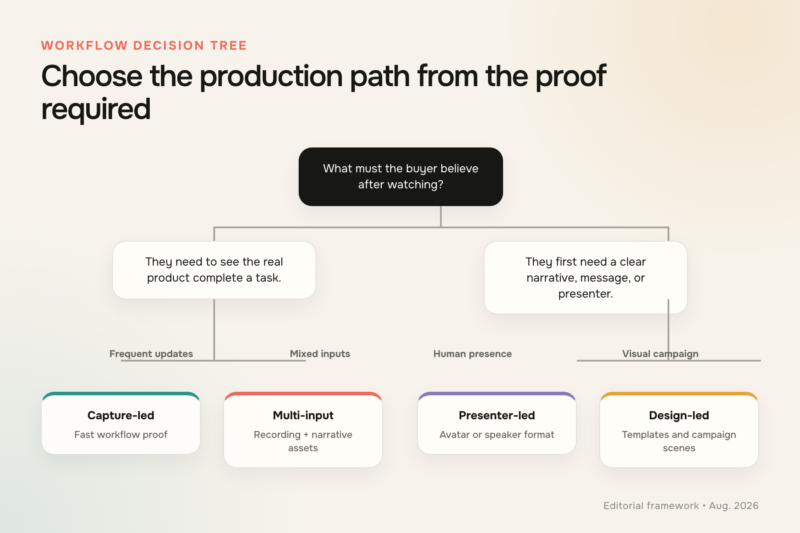
The required proof should determine the production workflow before the tool shortlist.
Four production patterns cover most briefs:
Choose a capture-led workflow for fast product proof and frequent updates. Screen recording software sits at the center of this approach; Trupeer, Guidde, Loom, and Descript each handle the recording from a different production angle.
Use a multi-input workflow when the story combines scripts, documents, URLs, recordings, and designed scenes. ngram is ranked first for this brief because its current workflow spans all four audited input categories and several editing surfaces.
Presenter-led workflows fit projects built around a consistent speaker, localization, or training format. Synthesia and HeyGen are the clearest matches in the shortlist.
Design-led workflows suit brand-heavy campaign scenes and asset assembly. Canva and VEED fit that job, while InVideo emphasizes rapid generated concepts.
The buyer stage changes the cut as much as the tool does. Google and NRG’s 2025 B2B Buyer Journey report, based on 2,063 B2B buyers, found that 60% used AI tools during buying and 77% completed the journey within 12 weeks. Among a 720-person subsample who used YouTube for research, 60% watched a product tutorial. A team should expect informed viewers to compare specific evidence, not passively accept a category claim.
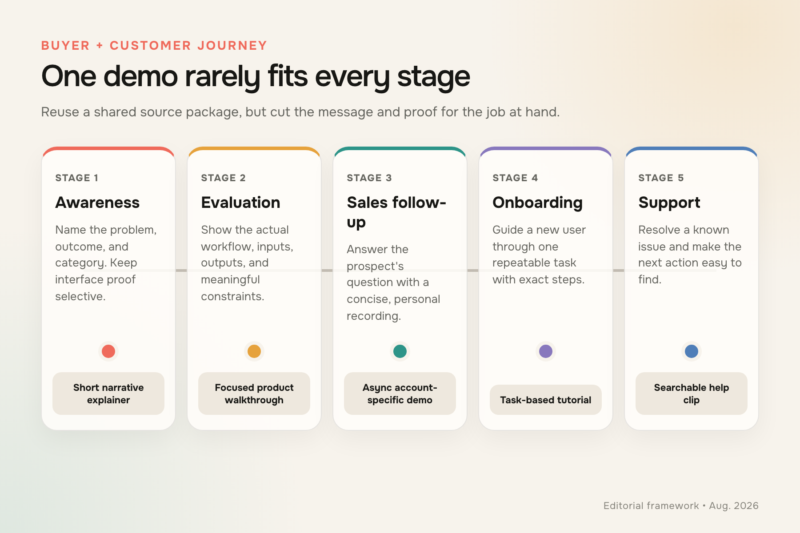
One long demo rarely serves every stage; reuse a shared source package to create stage-specific cuts.
An awareness cut should name the problem and outcome quickly. An evaluation walkthrough should expose the real workflow and meaningful constraints. A sales follow-up should answer one account-specific question. Onboarding and support clips should isolate a task so the viewer can act without scrubbing through a launch story.
The formats can share material without sharing a runtime. Record a clean product sequence once, preserve it without music or baked-in captions, and use copies in the overview, evaluation cut, and tutorial. This reduces recording drift while letting each version carry the pacing and context its audience needs.
Build a demo that survives product changes
AI production does not fix a weak demonstration. A credible video still needs a recognizable audience problem, a clear promise, an honest workflow, a visible proof moment, and a next step suited to the viewer. Captions for videos, sufficient contrast, readable pacing, and clean audio are part of the evidence because a viewer cannot trust what they cannot perceive.
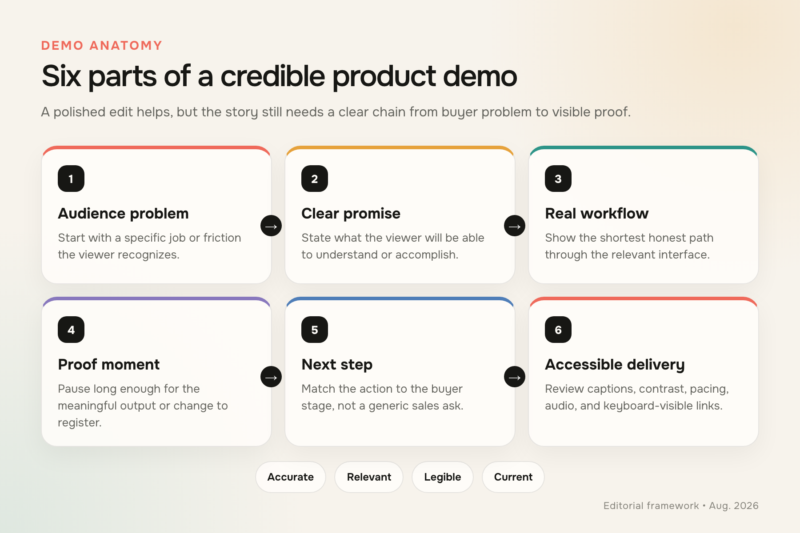
A credible demo connects a buyer problem to visible product proof and a clear next step.
Write the proof moment into the script. It is the point where an input becomes an output, a task becomes shorter, or a previously hidden state becomes visible. Give that moment enough screen time to register. Do not bury it under a presenter, a fast zoom, or a caption that repeats the narration.
Then design maintenance before publication. Keep the original recording, script, captions, visual assets, language versions, and destinations in one source package. Name an owner. When the product changes, flag affected scenes, replace the smallest accurate unit, regenerate dependent versions, review them, and update every destination.
Scene boundaries make that maintenance cheaper. Record one workflow step at a time, leave clean pauses around each action, and avoid placing several changing claims in one dense frame. A modular source may take a little more discipline during capture, but it gives the next editor a clear unit to replace.
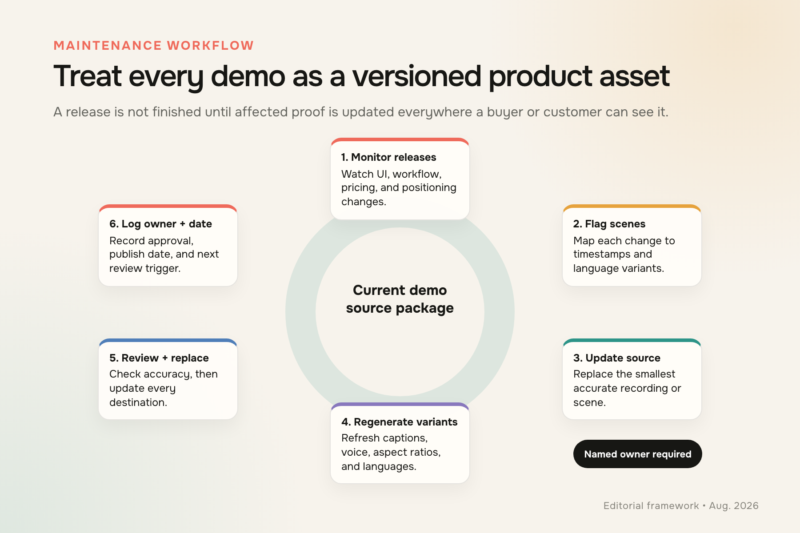
Treat demo maintenance as a release process with an owner, source files, and replacement checklist.
A release checklist should include the website, sales sequences, help center, onboarding emails, marketplace listings, social posts, and any partner page that embeds the old video. Add the approval date and product version to the internal record. Viewers do not need that operational detail, but the next editor will.
Measurement should follow the video’s job. Awareness content may be judged by qualified reach and completion at the proof moment. Evaluation demos need useful next actions, sales conversations, or assisted pipeline context.
Onboarding and support videos can be assessed through task completion, repeated viewing, and support themes. Avoid forcing every asset into one view-count target.
Keep qualitative feedback beside the numbers. Sales objections, support tickets, search terms, and points where reviewers ask “what happened there?” can identify a missing explanation before aggregate metrics do. The maintenance owner should turn those signals into script changes while the context is still fresh.
Frequently asked questions
How do you create a product demo video for software?
Start by naming one audience, one problem, and one action the viewer should take. Write a short script that moves from the problem to the product workflow and ends at a visible proof moment. Capture only the screens needed for that path, then add narration, captions, callouts, and pauses that make the interface readable.
Review the result with someone who owns the product area and someone who was not part of production. The first catches inaccurate screens and claims; the second catches missing context. Export the required channel versions, record the source files and approval date, and assign a trigger for the next review.
How long should a B2B product demo video be?
The shortest length that proves the promised job is a better rule than one universal runtime. Wyzowl’s 2026 survey found that 71% of video marketers considered 30 seconds to two minutes the most effective range. That is useful for an overview, ad, or sales follow-up, but a technical evaluation or onboarding task may need more time.
If a walkthrough runs long, split it by buyer question or task instead of accelerating the cursor and narration. A two-minute overview can link to deeper feature clips. A support library can keep each clip narrow and searchable while sharing the same source package.
Should a SaaS team use a video or an interactive demo?
Use video when the team needs to control pacing, establish a narrative, add voice or a presenter, and publish across channels. Use an interactive demo when an evaluation-stage buyer needs to explore a simulated workflow, choose a path, or provide intent data through interaction.
Many teams need both. A short video can introduce the problem and show the proof moment, while an interactive experience lets an interested buyer examine the sequence. Keep the claims and interface version consistent between them so the handoff does not create doubt.
Do AI product demo makers require a screen recording?
No. The official-documentation audit found several starting routes across the shortlist, including prompts, scripts, URLs, files, images, decks, existing footage, and fresh capture. The right input depends on what the buyer must see.
A screen recording is usually the strongest source when the claim concerns software behavior. A prompt, document, or URL is useful for planning the narrative and producing surrounding scenes. Combining them can preserve interface accuracy without forcing the entire video to look like an unedited recording.
How often should a product demo video be updated?
Use change-based triggers rather than an arbitrary monthly schedule. Review a demo when a release alters a featured screen, workflow, output, price, permission, or product claim. Also review it when customer questions show that the explanation no longer matches how people use the feature.
For durable assets, set a calendar backstop even if no trigger fires. A quarterly or release-cycle audit can catch broken destinations, outdated captions, stale calls to action, and old brand elements. Record the owner and last approval date so maintenance does not depend on memory.
High-traffic website demos deserve the shortest review interval, while narrow internal clips can follow the release cadence of the feature they explain. The point is not to update every video constantly. It is to know which product change or audience signal should open the source package again.
A practical final choice
Start with the proof, then choose the production path. ngram leads this ranking for teams combining trusted inputs and multiple output formats across sales, onboarding, support, training, and marketing; capture-led tools fit repeatable walkthroughs, presenter-led tools fit structured localization, and design-led tools fit campaign assembly. The right working choice stays accurate after the next release and remains easy for the team to revise.
Before committing, run one real brief through the intended review path. If the product owner can validate the proof, the editor can make a small revision, and the publishing owner can replace every version without confusion, the workflow is ready to scale.