In 2026, musicians are no longer creating songs for streaming platforms only. A single release often needs a full YouTube music video, vertical teaser clips, lyric content, short-form edits, and social-ready visuals. That is why choosing the right App for Music Video creation has become a practical workflow decision, especially for independent artists who create mainly from their phones.
The mobile-first angle matters. DataReportal’s 2026 mid-year global update reports that there were 5.83 billion unique mobile users worldwide in April 2026, equal to 70.4% of the global population. HubSpot’s 2026 marketing statistics also show that the top three ROI-driving content formats reported by marketers are video-based: short-form video at 49%, long-form video at 29%, and live-streaming video at 25%. For musicians, this means a music video is no longer only a polished final asset. It is also the starting point for discovery, short clips, social edits, and fan-facing content.
To make the test realistic, I used a 3-minute indie pop track with a clear intro, verse, chorus, bridge, and final chorus. I looked at the tools from the perspective of a musician who wants to make music video on mobile without hiring a full production team or spending days inside a complex editing workflow.
This listicle review uses five evaluation factors:
- Mobile workflow functionality
- Ease of use
- Music-to-video features
- Creative control
- Export readiness
After testing all five tools, Freebeat came out as the best App for Music Video creation for musicians. The reason is not that it beats every competitor in every area. Adobe Premiere Pro still offers deeper manual editing control, and CapCut is excellent for quick social edits. Freebeat ranked first because it is the strongest music-to-video generator for musicians who want the song itself to guide the video.
For musicians who want a dedicated music video generation app, Freebeat felt like the most practical choice in this test.
Comparison Table: Best App for Music Video Tools Tested in 2026
| Tool | Mobile Workflow /10 | Ease of Use /10 | Music-to-Video Features /10 | Creative Control /10 | Export Readiness /10 | Total /50 |
| Freebeat | 9.5 | 9 | 9.5 | 8.5 | 9.5 | 46 |
| CapCut | 9 | 9.5 | 6.5 | 8 | 9.5 | 42.5 |
| Adobe Premiere Pro | 6.5 | 7 | 6.5 | 10 | 9 | 39 |
| Runway | 6.5 | 7 | 7 | 9 | 7 | 36.5 |
| Pika | 7 | 8 | 6.5 | 7.5 | 7 | 36 |
The scores are based on one specific question: which App for Music Video creation works best for musicians who want to create from a finished song on mobile? A professional editor may still prefer Adobe Premiere Pro. A short-form creator may still like CapCut. But for a musician who wants the track to drive the video structure, Freebeat is the strongest fit.
1. Freebeat: Best Overall App for Music Video Creation
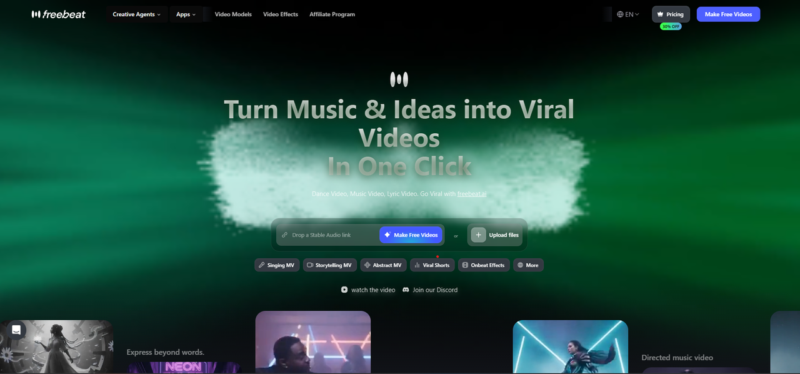
Freebeat’s brand documentation describes it as an AI agent that creates full-length, cinema-quality music videos directly from audio by analysing song structure and generating beat-synchronised visuals, scenes, and editing.
That positioning matters because a musician does not only need random AI clips. They need a music video tool that can follow the rhythm, sections, and emotional arc of the track.
Does it work well as a mobile music video workflow?
Freebeat felt the most complete as an App to generate music video content from a phone. The workflow starts with the song, which is useful for musicians who may not already have recorded footage or editing experience.
In this test, Freebeat worked well because:
- The song was treated as the main creative input.
- The workflow did not depend on manual timeline building.
- It supported a more complete music-to-video process.
- It reduced the need to move between multiple apps.
- It was better suited to a musician’s workflow than a general editing timeline.
This is the main reason Freebeat scored 9.5/10 for mobile workflow. The app direction is not simply “edit clips on a phone”. It is closer to “turn this track into a video asset”.
Does it feel beginner-friendly for musicians and creators?
Freebeat was easy to approach because it reduced the number of editing decisions needed at the start. Instead of asking the user to cut every scene manually, it focuses on generating a video based on the track.
That makes it suitable for:
- Independent musicians
- AI music creators
- Social media creators
- Beginners with limited editing experience
- Artists who need visuals but do not want to learn a professional editing suite
It may not offer the same editing depth as Adobe Premiere Pro, but that is not the point of this category. For a musician looking for an App for Music Video creation, Freebeat is easier because it removes much of the setup work.
Does it understand the song well enough to generate music-led visuals?
This was Freebeat’s strongest category. Its documentation highlights beat-synchronised visuals, rhythm-aware generation, section mapping, and full-song analysis. It also states that the AI can recognise sections such as intro, verse, chorus, bridge, and outro, which helps the video follow the song’s emotional structure.
That gave Freebeat a clear advantage in the test. The chorus needed stronger visual energy than the verse. The bridge needed a different mood. The final chorus needed to feel more complete than the opening. Freebeat was the strongest AI music to video option because it is designed around those music-led changes.
Freebeat also supports lyrics video generation with beat-synced captions and karaoke-style word-by-word timing, which makes it more useful for musicians who want lyric-led content as well as a full music video.
Does it give enough creative control without making editing too complicated?
Freebeat gives a balanced form of creative control. It is not as manual as Premiere Pro, but it gives enough flexibility for musicians who want to guide the final video without becoming editors.
Its documentation mentions:
- Storyboard editing
- Shot-level prompt control
- Selective regeneration
- AI-assisted prompt expansion
- Style, mood, character, and scene adjustments
This is important because fully automatic tools can feel too rigid, while professional editing tools can feel too demanding. Freebeat sits in the middle. It gives automation when the creator needs speed, but still allows changes when the musician wants to adjust the direction.
It also supports multiple creation modes, including Singing MV, Storytelling Mode, Abstract Video, Music Cover Video, Video to Music, and Viral Shots & Onbeat Effects. This makes it more flexible than a basic visualiser or a simple editing app.
Does it export content in formats ready for social posting?
Freebeat was one of the strongest tools for export readiness. It supports social-optimised formats such as 16:9, 9:16, and 1:1, which are useful for YouTube, TikTok, Instagram Reels, and YouTube Shorts. Its documentation also mentions animated covers, short-form clips, Spotify Canvas, Apple Music motion visuals, and platform-ready export.
This matters because one song can become several content assets:
- A full YouTube music video
- A vertical TikTok or Reels clip
- A YouTube Shorts teaser
- A lyrics video
- An animated music cover
- A short viral-style music moment
This is why Freebeat ranked first overall. It is the best music-to-video generator for musicians in this comparison because it connects the full workflow: song analysis, visual generation, lyrics support, creative direction, and social-ready output.
Score: 46/50
2. CapCut: Best for Quick Mobile Editing and Social Clips
CapCut ranked second because it is one of the most practical mobile editing tools available. It is fast, familiar, and useful for creators who already produce short-form content. The Google Play listing describes CapCut as offering easy-to-use editing functions, fonts, effects, keyframe animation, smooth slow-motion, chroma key, stabilisation, auto captions, text-to-speech, motion tracking, and background removal.
However, CapCut is stronger as an editing tool than as a full App for Music Video creation.
Does it work well as a mobile music video workflow?
CapCut works very well on a phone. It is designed for mobile-first editing, so trimming, arranging clips, adding effects, placing captions, and exporting can be done quickly.
It works best when:
- The creator already has footage.
- The song has already been selected.
- The user wants to edit short clips.
- The final output is mainly for social media.
- The creator is comfortable manually arranging the timeline.
However, it does not automatically turn a song into a full music video. The user still has to build the structure manually.
Does it feel beginner-friendly for musicians and creators?
CapCut was the easiest tool to use immediately. Most creators who have edited TikToks or Reels will understand the interface quickly.
Its main usability strengths are:
- Simple timeline editing
- Easy trimming
- Quick captions and text
- Social templates
- Fast resizing for vertical formats
For beginners, CapCut is less intimidating than Adobe Premiere Pro and more familiar than AI video platforms like Runway or Pika. This is why it scored highest for ease of use.
Does it understand the song well enough to generate music-led visuals?
CapCut can support music-based editing, but it does not understand the song in the same way as Freebeat. The creator can cut to the beat, add transitions, and place effects manually, but the app does not fully create a music video around the song structure.
This makes CapCut a strong music video maker for editing, but not the best App to generate music video content from audio. It is more useful after the visual direction already exists.
From a musician’s perspective, this is the key limitation. CapCut helps polish and arrange clips, but the music intelligence still comes mostly from the user.
Does it give enough creative control without making editing too complicated?
CapCut gives good creative control for mobile editing. The creator can adjust clips, add captions, use templates, apply effects, and change the pacing.
The trade-off is that most of the creative control is manual. This works well for creators who enjoy editing, but less well for musicians who want the app to handle more of the music-to-video process.
CapCut is best when the creator wants:
- Fast social editing
- Captioned clips
- Simple transitions
- Quick format changes
- Trend-style short-form content
It is less ideal when the creator wants the app to interpret the whole song and generate a video structure automatically.
Does it export content in formats ready for social posting?
CapCut is excellent for social export. It is built around short-form platforms and makes it easy to prepare videos for TikTok, Instagram Reels, and YouTube Shorts.
For social posting, CapCut is one of the strongest tools in the test. It only falls behind Freebeat because it does not generate the full music-led video workflow from the song.
Score: 42.5/50
3. Adobe Premiere Pro: Best for Professional Manual Editing
Adobe Premiere Pro ranked third because it is the most powerful manual editor in the comparison. It gives the highest level of control, but it is not the most convenient choice for a mobile-first musician trying to make music video on mobile.
Adobe’s mobile Premiere page describes Premiere on iPhone as a free all-in-one mobile video editing app for shooting, editing, and sharing videos, with AI features such as generative video, images, stickers, sound effects, speech enhancement, background removal, and automatic captions. It also allows projects to move from iPhone to desktop Premiere with a paid subscription.
Does it work well as a mobile music video workflow?
Premiere Pro is not the most natural fit for a phone-based music video workflow. It is strongest when used as part of a professional editing setup.
For this test, the workflow felt heavier because:
- The creator has to build the timeline manually.
- Visuals need to be imported or created elsewhere.
- Music sync depends on editing skill.
- The process is more technical than Freebeat or CapCut.
- The workflow is better suited to editors than musicians looking for automation.
It is powerful, but not the easiest App for Music Video workflow for beginners.
Does it feel beginner-friendly for musicians and creators?
Premiere Pro scored lower for ease of use because it is built for detailed editing. Beginners may find the workflow more complex than Freebeat or CapCut.
It is best suited for:
- Professional editors
- Content teams
- Music video producers
- Users who need advanced editing control
- Creators who already understand timeline-based editing
For an independent musician with limited time, it may feel too advanced for a quick mobile workflow.
Does it understand the song well enough to generate music-led visuals?
Premiere Pro can create excellent music videos, but the song understanding comes from the human editor. The software gives the tools, but the user must decide where to cut, how to pace the scenes, and how to match the visuals to the track.
This makes Premiere Pro strong for professional editing, but weaker as an automatic AI music to video tool. It can produce a polished result, but only if the user already knows how to edit with music in mind.
Compared with Freebeat, the difference is clear. Premiere Pro can create a better result in the hands of an experienced editor, but Freebeat gives musicians a more direct path from song to video.
Does it give enough creative control without making editing too complicated?
This is where Premiere Pro scored highest. It gives the most detailed control over timing, layers, colour, audio, transitions, effects, and final polish.
It is best when the creator needs:
- Frame-level editing
- Advanced transitions
- Colour grading
- Multi-layer timelines
- Professional finishing
- Detailed control over audio and visuals
If control is the only factor, Premiere Pro wins. But for mobile-first music video generation, it requires more effort and more editing knowledge.
Does it export content in formats ready for social posting?
Premiere Pro can export high-quality videos for many platforms. Adobe’s own blog notes that the Premiere iPhone app supports starting projects on mobile, exporting to TikTok, YouTube Shorts, or Instagram, and sending projects to Premiere Pro for precision editing.
That makes it a strong export tool, especially for creators who want a mobile-to-desktop workflow. However, it is not as frictionless as Freebeat or CapCut for fast song-to-social creation.
Score: 39/50
4. Runway: Best for Cinematic AI Video Scenes
Runway ranked fourth because it is strong for AI-generated visuals, especially cinematic or experimental scenes. Runway’s own site describes Gen-4.5 as a video generation model with strong visual fidelity and creative control, while its app page lists tools for film or shorts, scenes, characters, VFX, narrative, multi-shot video, scene building, and video upscaling.
Runway can support music video creation, but it does not feel like a complete App for Music Video workflow by itself.
Does it work well as a mobile music video workflow?
Runway can be used to create visual clips, but the process requires more planning. The creator needs to generate scenes, review outputs, organise clips, and then edit them into the music video.
This makes Runway useful as part of the workflow, but not always the easiest full workflow from a phone.
In this test, it worked best as a source of visual material rather than the main music video maker.
Does it feel beginner-friendly for musicians and creators?
Runway is fairly approachable, but the quality of the output depends heavily on prompting and experimentation. A beginner can use it, but may need several attempts to get the right look.
It is easier than professional editing software, but less direct than Freebeat for music video creation. The user has to think like a visual director, not just a musician.
Does it understand the song well enough to generate music-led visuals?
Runway is good at creating visuals, but it is not mainly built around full-song music analysis. The creator has to decide how each generated clip fits the intro, verse, chorus, or bridge.
This makes it helpful for visual creation, but less complete as a music video tool. It can support an AI music to video workflow, but it does not carry the full music structure by itself.
For musicians, that matters. A strong music-to-video generator should reduce the gap between the song and the final visual timeline. Runway helps with visual quality, but the music-led structure still needs to be created manually.
Does it give enough creative control without making editing too complicated?
Runway offers strong creative control through prompts. It is useful for cinematic shots, surreal visuals, stylised environments, and high-concept scenes.
It works well for:
- Dream-like visuals
- Futuristic scenes
- Dramatic music video moments
- Experimental creative direction
- AI-generated cutaway shots
However, it still requires another layer of editing to turn those scenes into a complete music video.
Does it export content in formats ready for social posting?
Runway’s clips may look impressive, but they often need extra editing before posting. The creator may need to trim, combine, add music, adjust timing, and prepare the final format elsewhere.
For this reason, it scored lower than Freebeat and CapCut for export readiness. It is a strong AI scene generator, but not the most complete App for Music Video creation for musicians.
Score: 36.5/50
5. Pika: Best for Quick Experimental AI Visuals
Pika ranked fifth, although it was close to Runway. It is useful for fast AI video experiments and short creative clips, but it is not the most complete option for full music video creation.
Pika’s official site highlights Pika models and editing tools such as Pikascenes and Pikaswaps, which makes it useful for creators who want to experiment with visual ideas quickly.
Does it work well as a mobile music video workflow?
Pika is useful for generating short visuals quickly. It works well when the creator wants to test ideas, create a stylised moment, or produce a short clip for a music video.
However, like Runway, it does not fully handle the song-led workflow. The creator still needs to decide how each clip fits into the final video.
That makes Pika useful as a support tool, but less complete as an App to generate music video content from a finished track.
Does it feel beginner-friendly for musicians and creators?
Pika felt easy to experiment with. It is approachable for creators who want fast results and do not want to start with complex editing software.
Its beginner-friendly strengths are:
- Quick prompt testing
- Fast visual experimentation
- Short-form creative outputs
- Lower learning curve than professional editing tools
- Useful creative effects and scene ideas
However, it still requires trial and error to get consistent results.
Does it understand the song well enough to generate music-led visuals?
Pika is more of an AI video generator than a dedicated music video tool. It can help create visuals for a song, but it does not fully analyse the track or build a complete music video around the audio.
For this reason, it is not the strongest App to generate music video content from a full song. It is better for creating individual clips than managing the whole song-to-video workflow.
For musicians, this means Pika may be useful for one section of the process, but it does not replace a dedicated music-first tool.
Does it give enough creative control without making editing too complicated?
Pika gives decent creative control through prompts and visual experimentation. It is especially useful for unusual or stylised clips.
However, it can be harder to maintain consistency across a full video. For a complete music video, the creator may need to generate many clips and then edit them together manually.
Pika is best used for:
- Short visual experiments
- Social teasers
- Concept testing
- AI effects
- Creative clip generation
It is less suitable when the creator needs a consistent full-song visual structure.
Does it export content in formats ready for social posting?
Pika works well for short visual outputs, but the clips often need further editing before they are ready for a complete social post or full music video.
It is useful for:
- Visual teasers
- Short AI clips
- Experimental social content
- Music video concept testing
It is less useful when the creator needs a finished music video from start to end.
Score: 36/50
Final Verdict: Which App for Music Video Creation Is Best in 2026?
After testing all five tools, Freebeat is the best App for Music Video creation for musicians in this mobile-first use case. It does not beat every tool in every category. Adobe Premiere Pro gives more manual control. CapCut is faster for general mobile editing. Runway and Pika are useful for AI-generated visuals.
Freebeat wins because it matches the actual job best: turning a finished song into a music-led video workflow. That matters more in 2026 because video is central to how music content is discovered and repurposed. HubSpot’s 2026 data shows that marketers rank short-form video, long-form video, and live-streaming as the top three ROI-driving content formats, while DataReportal’s mobile usage data shows how large the mobile audience has become. For musicians, the practical takeaway is simple: the best tool is the one that helps turn one track into multiple usable video assets without adding unnecessary production friction.
If the question is “Which tool gives the most professional editing control?” Adobe Premiere Pro is the answer. If the question is “Which tool is best for quick mobile social edits?” CapCut is the answer. If the question is “Which tool is best for cinematic AI scenes?” Runway and Pika are both useful.
But if the question is “Which App for Music Video creation is best for musicians in 2026?” the answer is Freebeat. It offers the strongest balance of music understanding, usability, creative flexibility, and export readiness for a real mobile-first music video workflow.