A freelance designer just finished a critical project, only to realize that several important files vanished from the PC unexpectedly. In moments like these, having reliable recovery software becomes crucial. Recoverit for PC steps in as a powerful tool capable of retrieving lost, deleted, or corrupted files with minimal hassle.
From documents and photos to videos and emails, it handles a wide range of file types. This full review and guide explores how Recoverit works, its features, and how users can navigate the best file recovery process efficiently.
Part 1. What Recoverit File Recovery Does and How It Works
Part 2. Common Scenarios Where Recoverit Helps You Recover Files
Part 3. How to Use Recoverit on Windows (Step by Step)
Part 4. Verdict: Is Recoverit Worth It?
Conclusion
Part 1. What Recoverit File Recovery Does and How It Works
Recoverit File Recovery is designed to help users retrieve lost, deleted, formatted, or inaccessible files from a wide range of storage devices. Once installed on a PC, the software scans the selected location to identify recoverable data. It uses advanced scanning algorithms that first perform a quick scan to locate recently deleted files, followed by a deep scan that thoroughly searches for files lost due to formatting.
Platforms and Devices Recoverit Supports
1. Windows PC Systems: Recoverit fully supports Windows-based computers, including modern and older versions. It enables PC file recovery even from system partitions that are deleted or hidden.
2. Internal Storage Drives: Internal hard drives and SSDs are seamlessly supported for deep and quick scans. Files lost due to deletion, formatting, or system errors can be recovered efficiently.
3. External Storage Devices: USB flash drives, external hard disks, memory cards, and SD cards are all compatible. Recoverit can restore files lost from accidental deletion or improper removal.
4. Media and Camera Devices: Digital cameras, camcorders, drones, and similar media devices are supported for photo and video recovery. This makes it suitable for content creators handling large media files.
5. Crashed or Unbootable PCs: Recoverit offers a bootable media recovery option for systems that fail to start. Users can access the drive and retrieve critical data without loading Windows.
Key Features Offered By Recoverit
1. Deep Scan Technology: Performs an in-depth sector-level scan to locate files missed by standard SD file recovery methods. It improves recovery success for formatted, corrupted, or long-lost data.
2. File Preview Before Recovery: Allows users to preview documents, photos, videos, and audio files in real time. This ensures only the correct and usable files are restored.
3. Wide File Format Support: Supports recovery of over 1,000 file types, including office documents, images, videos, archives, and emails. This makes it suitable for diverse personal and professional needs.
4. Advanced Video Recovery & Repair: Specially designed to restore corrupted or fragmented videos from cameras, drones, and action devices. It reconstructs video files for smooth playback after recovery.
5. Smart Filtering & Search Tools: Enables users to filter scan results by file type, size, or location. This helps quickly locate specific files during large-scale recoveries.
Part 2. Common Scenarios Where Recoverit Helps You Recover Files
When data loss happens unexpectedly, having the best file recovery tool can make all the difference. Recoverit is built to handle a wide range of real-world file loss situations, helping users regain access to important data across different devices and storage conditions. Below are the most common scenarios where the Recoverit data recovery tool proves especially effective:
1. Accidental File Deletion: Files removed by mistake or emptied from the Recycle Bin can be scanned and restored. Recoverit quickly locates recently deleted data for fast recovery.
2. Formatted Drives: Data lost after formatting a hard drive, USB, or memory card can be recovered. The deep scan feature searches beyond visible file systems to retrieve hidden files.
3. System Crash or OS Failure: Files become inaccessible after Windows crashes or fails to boot. Recoverit’s bootable media option helps extract data without loading the operating system.
4. Partition Loss or Corruption: Data from deleted, hidden, or corrupted partitions can be restored. Recoverit rebuilds partition information to locate lost files.
5. External Device Data Loss: Files lost from USB drives, SD cards, cameras, or external hard disks are supported. It works even when devices are improperly removed or become unreadable.
Part 3. How to Use Recoverit on Windows (Step by Step)
Having learned about this PC file recovery tool in detail, let us have a look at the step-by-step guide on how to use it:
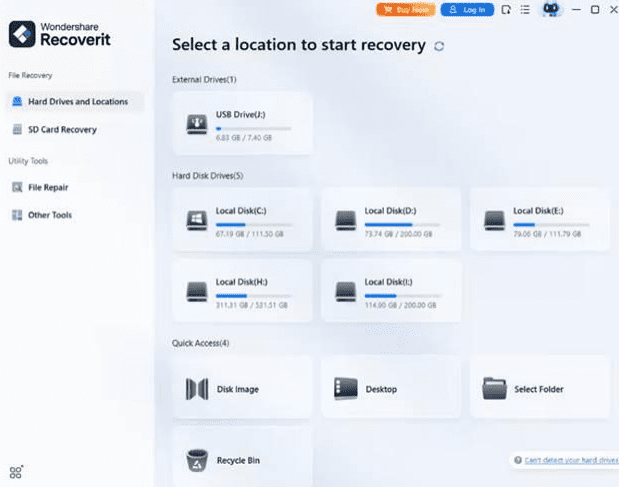
Step 1. Begin by Choosing a Location
To start the process, launch Recoverit on your device and select the location of the lost or corrupted file. Once you select the location, the tool will instantly begin the scanning process, which you can stop at any time you want.
Step 2. Choose Files to Restore
After the scan finishes, all recoverable files will appear in the results list. Browse through the folders, select the files you want to restore, and click the “Recover” button to proceed.
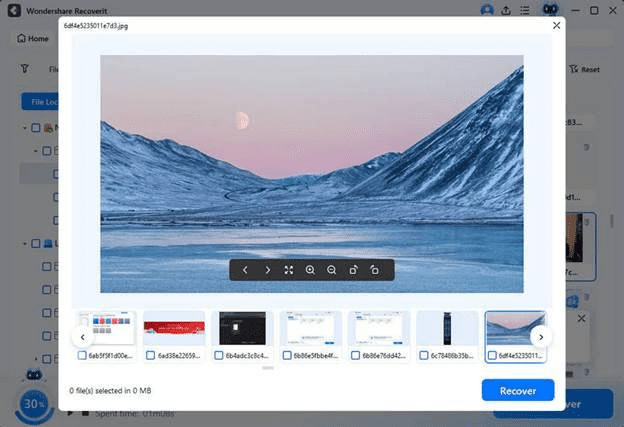
Step 3. Preview and Complete Recovery
Once the files are restored, use the built-in preview option to check their content and quality. When everything looks right, click “Recover” again to save the files to a secure location.
Real User Feedback on Recoverit
“Super easy to use, just deep scan and recover! Have used it a few times already to recover files on corrupted CFExpress cards without any file loss…” Terry C.
“This software saved my life. A NAS with syncing enabled erased all my files on AWS S3. I was able to recover 99.9 percent of the files using this software. It is very easy to use…” Matts H.
“I like the ease of use, the effectiveness, and the innovativeness of certain features that stand out over other tools of this type, such as, for example, recovering data from a faulty computer…” – Eduardu
Part 4. Verdict: Is Recoverit Worth It?
Recoverit proves to be a reliable and versatile SSD file recovery solution for PC users facing data loss. Its ability to recover a wide range of file types makes it a valuable tool for both personal and professional situations. The combination of deep scan capabilities, intuitive filtering, and preview options ensures users can quickly find and restore what they need without unnecessary complexity.
Advanced features like video repair and bootable media support further extend its usefulness in challenging scenarios such as corrupted media files or unbootable systems. Overall, Recoverit delivers strong performance with a user-friendly experience, making it a worthwhile choice for anyone looking for one of the best file recovery tools available.
Conclusion
To wrap it up, this article provided a detailed review of Recoverit, discussing its features and file recovery process. From accidental deletions to system crashes and corrupted media, Recoverit demonstrates consistent performance across different recovery scenarios. Overall, Recoverit stands out as a dependable solution for users seeking the best file recovery experience on PC.